
Increase Your Google Gmail & Workspace Open Rates with Our Warm-Up Solution
Warm up your sender emails to boost deliverability across Gmail and Google Workspace. Build a trusted sender reputation and keep your messages out of spam.
Connect and Warm Up Any Email Service Provider








How Our Process Works Behind Reliable Email Growth
See how our automated process steadily strengthens your sender score and unlocks higher sending volumes safely
1. Connect your email account
The onboarding process is handled manually. We’ll collect your SMTP/IMAP details and securely connect your email account to our warm-up system. You can use Google Workspace, Outlook, cPanel, or any other email service provider.
2. Sending Emails & Moving Out of Spam
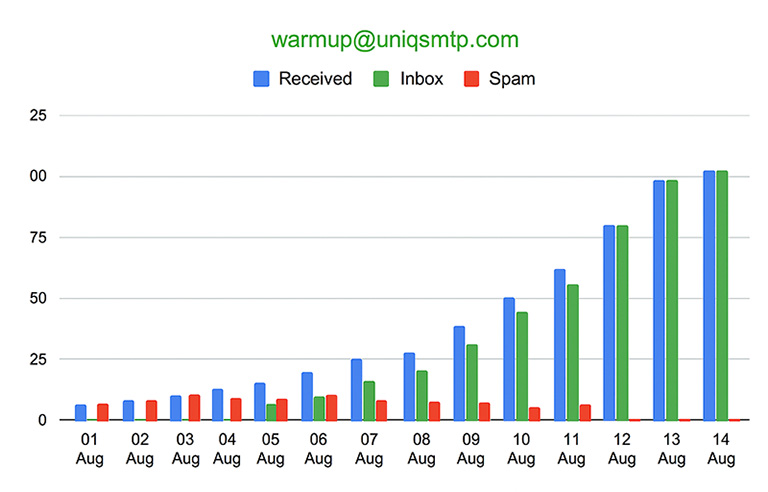
Our system automatically sends emails using your provided template, including links, from your account to other inboxes in our warm-up network. If any of your messages land in spam, they’re automatically marked as “Not Spam” and moved to the inbox. Our system also flags the message as “Important,” helping your account reputation grow faster..
2. Sending Emails & Moving Out of Spam
Our system automatically sends emails using your provided template, including links, from your account to other inboxes in our warm-up network. If any of your messages land in spam, they’re automatically marked as “Not Spam” and moved to the inbox. Our system also flags the message as “Important,” helping your account reputation grow faster..
3. Simulated Inbox Engagement
Incoming emails from our warm-up network are opened automatically to replicate genuine human engagement and strengthen your sender reputation.
4. Automatically Replying to Incoming Emails
Our system intelligently interacts with incoming messages from other accounts in our warm-up network. It reads the email content and sends natural, human-like replies automatically to build authentic engagement and strengthen your sender reputation over time.
4. Automatically Replying to Incoming Emails
Our system intelligently interacts with incoming messages from other accounts in our warm-up network. It reads the email content and sends natural, human-like replies automatically to build authentic engagement and strengthen your sender reputation over time.
Flexible Email Warm-Up Plans
Start with a single inbox to build trust, and add more accounts as your business expands and keeping your email reputation strong every step of the way.
One Time
65$
0$ Setup Fee
1 IP & 1 Domain only
Upto 100 Emails/day
1 Customer Email Template
Warm-up for maximum 4 weeks
Daily report by email
Monthly Recurring
50$
15$ Setup Fee
1 IP & 1 Domain only
Upto 100 Emails/day
1 Customer Email Template
Warm-up for recurring month
Daily report by email
Looking for a custom plan?
Got Questions? We’ve Got Answers
Find quick answers to the most common questions about our email warm-up process, setup, and reporting. Everything you need to know to get started and make the most of our service.
What is Liftinbox?
LiftInbox is an automated email warm-up system built specifically for Gmail and Google Workspace email addresses. It gradually builds your sender reputation and ensures your emails are recognized as legitimate, improving deliverability and keeping you out of spam folders.
What’s the ideal warm-up duration for an email account?
A longer warm-up period generally leads to stronger reputation and higher inbox rates. Still, for active senders, a minimum of 21 days is often sufficient to achieve reliable results.
Do you provide a newsletter for warming up emails?
Yes! We include a simple HTML newsletter for your warm-up. But for the best inbox results, it’s even better to use your actual marketing newsletter with real links. Each account comes with one newsletter free of cost, and you can add more if needed at a small additional cost.
What if my sender address uses multiple rotating IPs?
IP reputation plays a crucial role in email deliverability. When multiple IPs are involved, it takes longer to build a consistent reputation. We recommend extending the warm-up period based on the number of IPs. You can also contact us for a custom warm-up plan tailored to your setup.
How does the onboarding process work?
We handle onboarding manually to make sure everything is set up correctly. After payment, just:
1 - Send us your sender email details (SMTP/IMAP).
2 - Share your HTML newsletter with images so we can start the warm-up.
How do I get my warm-up reports?
After your warm-up starts, we’ll send you daily reports straight to your provide email address. Each report includes easy-to-read charts and key stats showing your progress and how your deliverability is improving over time.